

Topics
-
AI News from ET - AMD to invest up to $5 billion in Anthropic; AI startup to buy up to 2 GW of chips
AMD has been seeking to expand its foothold in the fast-growing AI chip market as developers look to diversify beyond Nvidia, while Anthropic has been racing to secure computing capacity to meet growing demand for its AI services. View the full article -
A Meta Platforms lawsuit claims AI tools unfairly targeted employees for layoffs. Workers face difficulties proving AI discrimination due to limited access to internal processes. Arbitration agreements often prevent collective legal action and public scrutiny of workplace disputes. These hurdles explain the scarcity of high-profile AI employment lawsuits. Meta denies using AI for layoff decisions, stating humans made all choices. View the full article


Leaderboard
-
Sumukha Nagaraja
Fraternity Members1Points23Posts -
Akkul Dhand
Members1Points18Posts -
Debanjana Basu
Members1Points10Posts


Popular Content
Showing content with the highest reputation on 08/11/2025 in all areas
-
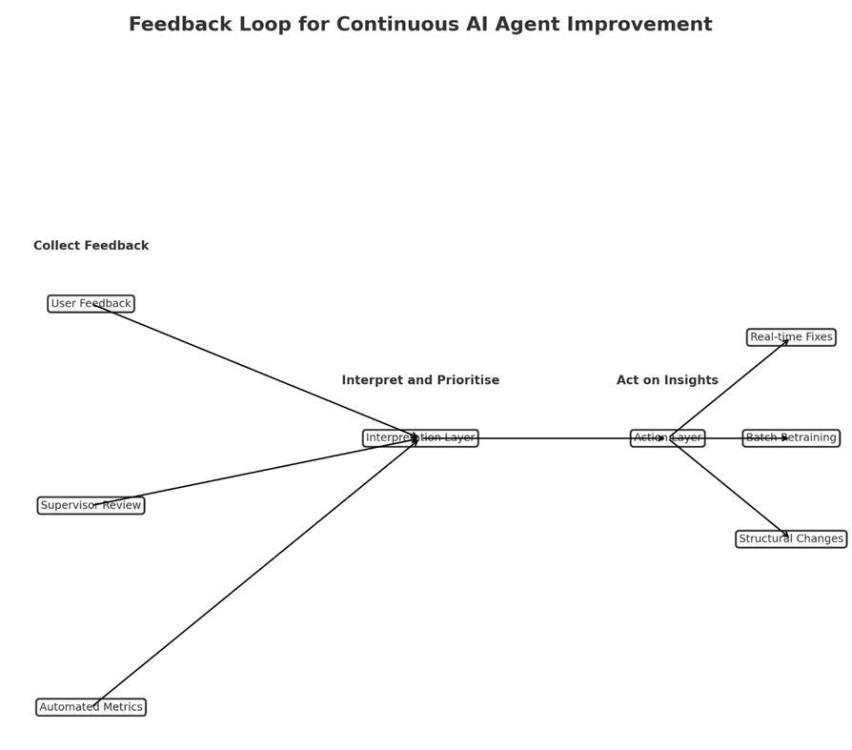
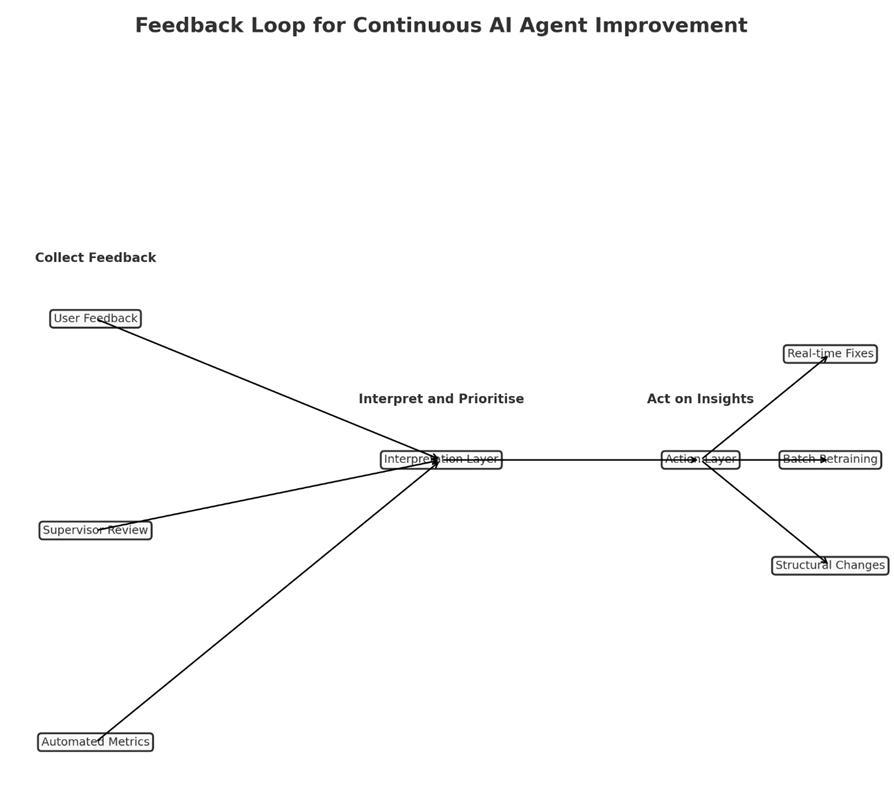
How I Would Build a Feedback System for an AI Customer Service Agent? It’s like hiring a new customer service rep. - you would not throw them in front of customers on the first day and hope for the best, instead you would watch how they perform, collect feedback from customers and supervisors, and help them improve. An AI agent needs the same kind of ongoing training. Three Ways to Collect Feedback Ask Customers Directly but Keep It Simple: After the AI helps with a real question, show three quick buttons: thumbs up, neutral face, or thumbs down. Include a small text box so customers can add a quick note such as “Did not understand my mortgage question” or “Gave me the right answer but sounded robotic.” The key is to ask only after meaningful conversations, so customers are not continuously prompted after every single interaction. Have Human Experts Check the AI’s Work Once a week, experienced supervisors can review a sample of conversations, focusing on ones with poor ratings, long resolution times, or high-stakes topics like compliance. They will spot details that metrics miss, such as “The AI gave correct information but did not recognise that the customer was frustrated about a fee.” Reviewing a sample, rather than every conversation, keeps the process manageable. Track the Numbers Monitor essential metrics such as first-time resolution, the number of cases escalated to human agents, and average resolution time for each case. Occasionally, you may send test questions where you already know the correct answer to ensure the AI is still performing well. Making Sense of the Feedback Collecting feedback is easy, making it useful takes work. Start by grouping similar issues together, such as “Does not understand regional accents,” “Too formal when customers are upset,” or “Provides incorrect information.” Prioritise by severity. A calculation error is far more serious than sounding overly formal. Look for patterns, for example, whether accuracy drops on Mondays when there is a backlog from the weekend. Three Speeds of Improvement 1. Quick fixes can be made in a day or two, such as updating outdated information. 2. Regular updates can happen once a month, retraining the AI on the most common issues identified in the feedback. 3. Big changes, such as adding advanced document-reading capabilities such as OCR, will take longer and require more planning. Avoiding Feedback Overload Too much feedback can overwhelm the team; focus on the interactions that reveal the most. Address urgent issues immediately and save routine improvements for the monthly review. Once an issue has been resolved and stays fixed for a few months, stop monitoring it closely and turn your attention to new challenges. Keep People Involved Let customers and employees know their feedback matters. If you improve the AI’s ability to answer product questions based on someone’s suggestion, say so: “We have improved how our AI handles product inquiries based on your feedback.” When employees see that their input leads to real improvements, they will continue offering valuable suggestions. The Bottom Line Maintaining an AI agent is like maintaining a car. You make small adjustments as needed, schedule regular check-ups, and only conduct major repairs when something fundamental needs to change. The goal is steady improvement, so the AI gets better every week without frustrating customers or overwhelming the team.
 1 point
 -
It is crucial to provide ongoing feedback to AI agents so that they can learn from the to keep providing updated information. Let us assume that we have an AI agent that converts legacy code to a cloud-native language during system migration. We would need a feedback loop to be as structured and domain-aware as the migration process itself. Below are some techniques to collect, interpret and act on real-world feedback (from users, supervisors, or performance data) to continuously improve the agent : - 1. Feedback Collection – a) Developers reviewing AI converted code can flag code blocks with recurring issues like syntax errors, performance issues or deviation from architectural guidelines. b) AI generated report that shows the confidence score for each converted code. c) Track time required for manual remediation of AI-converted code and post deployment deployment metrics like execution time, resource consumption of running migrated code in cloud environment. d) Testers and Migration leads can keep track of the recurring issues and statistics around it. 2. Feedback Interpretation – a. classify feedback into types — syntax/compilation, semantic mismatch, security compliance gap etc. b. Consolidate issues to identify patterns in migration c. Compare AI generated report ion confidence score vs the reviews conducted by developers, testers and migration leads 3. Act on the Feedback – a. Fine tune model based on frequently occurring error patterns b. Update prompt templates and transformation rules with explicit project-specific coding standards (naming, architecture patterns, security requirements While it is important to optimize the performance and outcome of the AI agent, we can prevent overloading by manual resolution of minor formatting issues , or instead of reviewing every conversion, we can prioritize low-confidence or high-complexity conversions. Thus the agent will not only convert code but also learn from every migration cycle with feedback loop designed to catch errors, preserve best practices to evolving cloud practices.1 point
-
Let's look at a real-world scenario to see how to construct a strong and valuable feedback loop for improving an AI agent after it has been put into operation. For instance, an AI customer service person that works for a company that provides financial services. This assistant helps people who have inquiries about how to manage their accounts, make purchases, and receive support with items. A Look at Feedback Loop Design There would be three stages of the feedback loop: Feedback that the user begins (Explicit) Feedback that the system gives you (implicit) Human (Supervisor or Lead) in the loop (HITL) should check it out. A centralized feedback processing pipeline receives feedback from each layer, sorts it, rates it, and sends it to either Automated learning modules for modifications that aren't too risky People look at significant or private issues in lineups Ways to collect feedbacks or comments 1. Clear feedback from users After each communication, you can give them a thumbs up or down or a star rating. Inline modifications or recommendations, like "That's not what I meant," start the process of capturing the intended revision. Short surveys after each session to get qualitative feedback Design tip: Keep it light and optional. Only ask for help after a big interaction or when a task is finished or not. 2. Implicit Feedback on Behavior: When a user quits a chat in the middle of it, they are giving feedback on their behavior. Asking the same inquiry over and over or getting a human agent involved Latency or hesitation (the user takes a long time to respond or suddenly changes the subject) To locate places where people are having problems interacting, these signals are marked and given a score. 3. Comments from the supervisor and the audit There are notes about human agent escalations, such as "AI got the request wrong." Random encounters are scored and grouped by quality during periodic audits (for example, tone mismatch or outdated information). Tagging for compliance, especially in sensitive areas like delivering financial advice Feedback that has been marked by a boss is more important. Getting criticism and learning from it Tiered Processing Pipeline: Automatically tagging and grouping similar problems, such "tone issues" and "entity mismatches," using heuristics and NLP classifiers. Making a decision based on risk assessment: Is it possible for the model to fix itself by retraining? Do you need to update the template or prompt? Or should this go to human developers? Routing Feedback: Adjusting the prompt or retraining on grouped samples automatically applies low-risk fixes. A person must look over and approve high-risk fixes before they may be added. How to Avoid Getting Too Much Feedback: Threshold-based Sampling: Only reveal feedback when there is a pattern, such when five or more people complain about the same item. A way to put feedback in order: Impact (frustration score) twice Frequency is the same as Priority Score Digest of the Day: Dashboards for teams that illustrate the most significant issues, possible solutions, and plans for putting them into action. Feedback Archiving Windows: Old feedback that has been dealt with is put away so it doesn't happen again. Finding Tone Mismatches: An Example in Action Users give the bot a "rude" rating in more than 10 sessions when it responds to late payments. A high pace of escalation in those negotiations is an implicit sign. The supervisor says that three interactions are "too formal." The system puts these together and offers a prompt modification to soften the tone: You haven't paid yet. Please repair this right now. To: "It looks like your payment is late. Let's work together to make it better! Used through A/B testing, watched, and proved that it got better Summary: Why This Works Practical: in the Real World Uses real signals (both implicit and explicit), automates low-risk tasks, and gets people involved when they need to be. Relevant: directly applicable to areas such as healthcare, HR support, financial services, and others. Balanced: teams are always getting better without too much stress, and there are built-in safety safeguards and human oversight.1 point
This leaderboard is set to Kolkata/GMT+05:30