

Topics
-
A significant chipmaking tool from ASML has arrived in New York. This advanced equipment will drive research into future chip designs and manufacturing. The Albany NanoTech Complex is North America's sole facility of its kind. This transformative technology development places the US at the forefront of innovation. The tool is expected to be fully operational by the year's end. View the full article
-
As part of the agreement, Microsoft Azure customers will be able to develop software using Mistral's data centers in France, giving Microsoft more capacity in Europe and regulated industries an alternative to U.S.-controlled infrastructure. View the full article


Leaderboard
-
P Balakumaaran
Members1Points13Posts -
Ravindra Kulkarni
Members1Points7Posts


Popular Content
Showing content with the highest reputation on 06/10/2022 in all areas
-
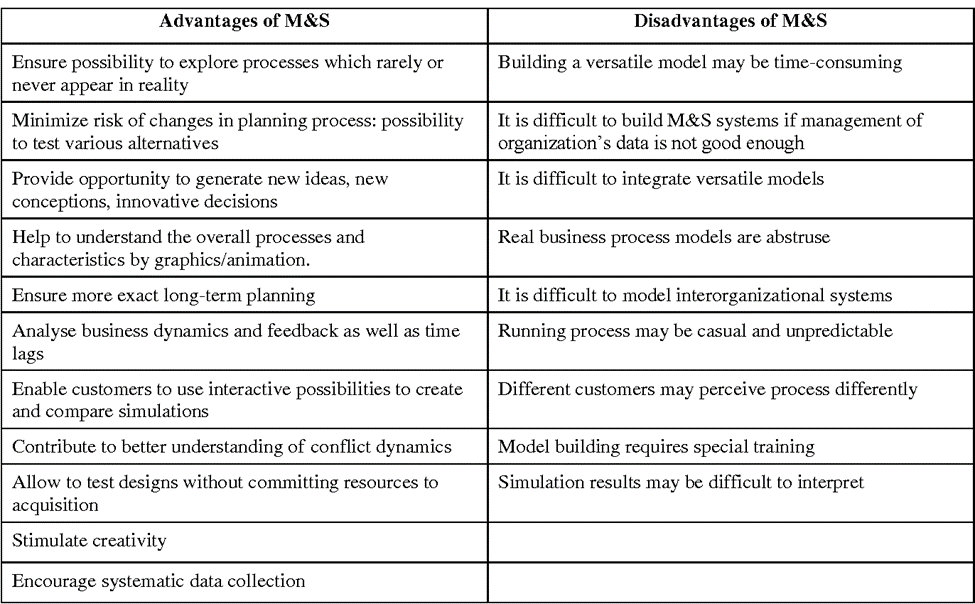
1 pointOrganisations who use DMAIC to improve processes often take months to reach the analyse phase. Business modelling practitioners know the importance of time in implementing the change initiatives in an organization. Simulation is one way to accelerate change. “ A simulation is the imitation of the operation of a real-world process or system over time. Simulations require the use of models; the model represents the key characteristics or behaviours of the selected system or process, whereas the simulation represents the evolution of the model over time. Often, computers are used to execute the simulation”. Source wikipedia Business Modelling is a replication of real world processes using simulation models which use business assumptions, Decision making and Forecasting. Below are the reasons why Business Modelling and Simulation can accelerate the DMAIC sequence of an improvement project. Simulation eliminates the measure and analyse phase. Simulation models can work on large datasets, can run 1000 of trails taking into account process variances, uncertainties and interdependencies and provide multiple solutions. Running Simulation models doesn’t interfere with day to day work in an organization. Impact on operations, processes and customers can be measured and visualised.1 point
-
1 pointModeling and simulation (M&S) is the use of a physical or logical representation of a given system to generate data and help determine decisions or make predictions about the system. A Business Simulation is a computer-based model of business processes and dynamics. The simulation model establishes a set of complex relationships between the business variables corresponding to significant entities in the business domain. The Business modelling and simulation in turn supports the Improvement projects driven by DMAIC methodology in the Measure, Analyze & Improve Phase. Measure Phase: The business model helps to validate the data collected during the Measure Phase. The mathematical model will help to narrow down only the significant variables, for which the data collection can be done. The simulation may help to optimize the quantum of data collected. Directly reduce the time and cost spent on the data collection. Analyze Phase: Apart from the Conventional analysis tools that we use for Problem solving, the optimization models give us an advantage to arrive at the root cause / significant variable quickly and objectively. This eliminates the subjectivity of the analyze phase. The simulation helps to validate, if the root cause / significant variable arrived from the model is valid. This also helps to prioritize the variable to work on. Improve Phase: The model and the simulation becomes the Step Zero before the Pilot run. This helps to avoid the adverse effects of implementing the wrong solution directly not the Pilot process. The model and simulation helps to see the possible impact of implementing the solution on other variables. This will definitely help to save a lot of time and money, especially helps to avoid the risk. Thus the business modelling and simulation can help to accelerate the DMAIC process for any improvement.

 1 point
This leaderboard is set to Kolkata/GMT+05:30