

Topics
-
AI News from ET - AMD to invest up to $5 billion in Anthropic; AI startup to buy up to 2 GW of chips
AMD has been seeking to expand its foothold in the fast-growing AI chip market as developers look to diversify beyond Nvidia, while Anthropic has been racing to secure computing capacity to meet growing demand for its AI services. View the full article -
A Meta Platforms lawsuit claims AI tools unfairly targeted employees for layoffs. Workers face difficulties proving AI discrimination due to limited access to internal processes. Arbitration agreements often prevent collective legal action and public scrutiny of workplace disputes. These hurdles explain the scarcity of high-profile AI employment lawsuits. Meta denies using AI for layoff decisions, stating humans made all choices. View the full article


Leaderboard
-
Akkul Dhand
Members2Points18Posts -
Ayomide
Members1Points10Posts -
Sumukha Nagaraja
Fraternity Members1Points23Posts -
Mayank Gupta
Members1Points679Posts


Popular Content
Showing content with the highest reputation on 08/12/2025 in Posts
-
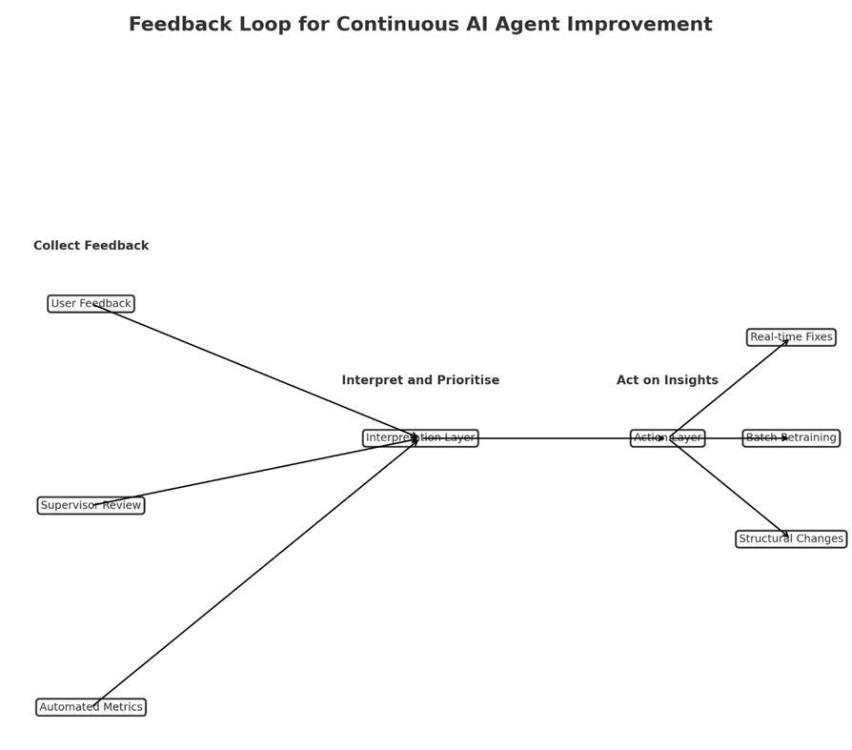
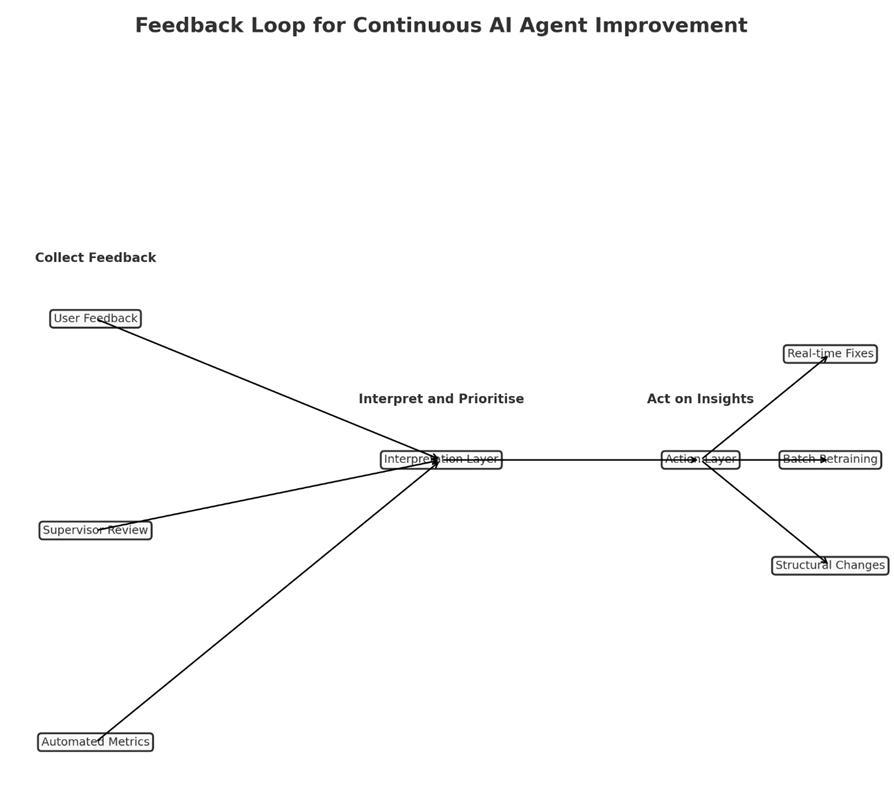
How I Would Build a Feedback System for an AI Customer Service Agent? It’s like hiring a new customer service rep. - you would not throw them in front of customers on the first day and hope for the best, instead you would watch how they perform, collect feedback from customers and supervisors, and help them improve. An AI agent needs the same kind of ongoing training. Three Ways to Collect Feedback Ask Customers Directly but Keep It Simple: After the AI helps with a real question, show three quick buttons: thumbs up, neutral face, or thumbs down. Include a small text box so customers can add a quick note such as “Did not understand my mortgage question” or “Gave me the right answer but sounded robotic.” The key is to ask only after meaningful conversations, so customers are not continuously prompted after every single interaction. Have Human Experts Check the AI’s Work Once a week, experienced supervisors can review a sample of conversations, focusing on ones with poor ratings, long resolution times, or high-stakes topics like compliance. They will spot details that metrics miss, such as “The AI gave correct information but did not recognise that the customer was frustrated about a fee.” Reviewing a sample, rather than every conversation, keeps the process manageable. Track the Numbers Monitor essential metrics such as first-time resolution, the number of cases escalated to human agents, and average resolution time for each case. Occasionally, you may send test questions where you already know the correct answer to ensure the AI is still performing well. Making Sense of the Feedback Collecting feedback is easy, making it useful takes work. Start by grouping similar issues together, such as “Does not understand regional accents,” “Too formal when customers are upset,” or “Provides incorrect information.” Prioritise by severity. A calculation error is far more serious than sounding overly formal. Look for patterns, for example, whether accuracy drops on Mondays when there is a backlog from the weekend. Three Speeds of Improvement 1. Quick fixes can be made in a day or two, such as updating outdated information. 2. Regular updates can happen once a month, retraining the AI on the most common issues identified in the feedback. 3. Big changes, such as adding advanced document-reading capabilities such as OCR, will take longer and require more planning. Avoiding Feedback Overload Too much feedback can overwhelm the team; focus on the interactions that reveal the most. Address urgent issues immediately and save routine improvements for the monthly review. Once an issue has been resolved and stays fixed for a few months, stop monitoring it closely and turn your attention to new challenges. Keep People Involved Let customers and employees know their feedback matters. If you improve the AI’s ability to answer product questions based on someone’s suggestion, say so: “We have improved how our AI handles product inquiries based on your feedback.” When employees see that their input leads to real improvements, they will continue offering valuable suggestions. The Bottom Line Maintaining an AI agent is like maintaining a car. You make small adjustments as needed, schedule regular check-ups, and only conduct major repairs when something fundamental needs to change. The goal is steady improvement, so the AI gets better every week without frustrating customers or overwhelming the team.
 2 points
 -
Akkul Dhand has provided the winning answer to this question. Answer fro Sumukha is also a must read.1 point
-
There is no doubt to the fact that AI Agents live and breathe on data fed to it which means garbage in garbage out. Data integrity is key to ensuring that AI agents are able to right solutions to problems. The first loop is therefore to ensure that data been fed to these agents are being cleaned before they are fed in. Now to the next phase after the data has been fed to these agents, they get better over time which is based on the training using available data over time. In cases where agents go off track, it is the responsibility of the builder to give accurate feedback to the agents where it must have gone off track or given wrong information so as to document that mistake as a data point and ensure it is stored in its repository to prevent reoccurrence. Most often than not people ignore the errors in AI Agent's responses due to several reason and just copy the outcomes without reviewing for mistakes and errors. If these errors are accepted, it builds the confidence level of the AI Agents into believing that responses provided are 100% correct and stores them as data points as well which would be used to answer and proffer solutions to future problems and then the loop continues. In other to prevent this from happening, first is for AI Agent builders to infuse the feedback look asking if the solution provided meets the users need ot there are specific areas where some changes need to be made. Some can be built in such a way that the AI Agent asks more clarifying questions to allow the user give proper context to help the AI Agent proffer the best solution through contextual framing. Also, feedback rating in my opinion isn't the best way to help the Agent improve on responses or solution but proper feedback on areas where the agent hasn't provided right answers, provided longer responses than needed, the use of words that doesn't make things sound real and a host of other are super important if we aim to help the AI Agents improve based on real feedback. In other words, as much as we want AI Agents to move from very generic responses when proffering solutions to out problems, we should equally be ready to shift away from giving generic feedback to AI Agents as these serves as data points for them to reference is they are to improve and give better outputs.1 point
-
Any AI design should incorporate a feedback mechanism to ensure the AI is on track consistetly and serves the purpose of its design. This is an important design aspect, as any system design will always possess an element of uncertainty which can come in a form of extreme use cases, extreme users and other environment conditions for which th AI would not have been trained. The feedback mechanisms can be incorporated by the following ways Direct feedback mechanism loop : This kind of feedback is very essential in a conversational AI agent. We can build in a thumbs up or a thumbs down icon for very response that AI agent gives. If the user gives thumbs down, the design can prompt to elaborate why the response is not as per the users expectation. We can gather periodically the thumbs down and analyse and make improvements. The most important thing is to improve incrementally and not radical overhaul. By this way we can ensure that the system and the users are not overwhelmed by the change. Also there a lot of AI agents having an option of reporting and issue. Building this option can be very helpfull if the AI agents response is inappropriate and not related to the subject question it is designed to solve. This can be analysed and AI can be retrained to fix the concerned use case issue. Performance Monitoring: This is another method to elicit feedback. For example in a IT ticketing support agent, we can measure the AI system performance by gathering the number of accepted resolution or okayed and the number of unresolved tickets. This will directly help us to check the use cases where the AI agent is not able to resolve. The AI agent can then be trained separately to address these uses cases so it learns and then monitor again to see if these use cases are resolved in real time scenarios during ticketing process. Continuos monitoring and incremental improvement: A team comprised of developers, functional consultants and internal IT users amcan be formed to monitor the AI agents performance and effectiveness of functioning in the real world, simulate it in a test environment with extreme uses cases and conditions so as to proactively identify issues and retrain the AI and keep it on track consistently. In summary, feedback mechanisms is an integral part of the AI agent design which helps the AI agent to be ontrack and serves the purpose for which it was designed.1 point
-
It is crucial to provide ongoing feedback to AI agents so that they can learn from the to keep providing updated information. Let us assume that we have an AI agent that converts legacy code to a cloud-native language during system migration. We would need a feedback loop to be as structured and domain-aware as the migration process itself. Below are some techniques to collect, interpret and act on real-world feedback (from users, supervisors, or performance data) to continuously improve the agent : - 1. Feedback Collection – a) Developers reviewing AI converted code can flag code blocks with recurring issues like syntax errors, performance issues or deviation from architectural guidelines. b) AI generated report that shows the confidence score for each converted code. c) Track time required for manual remediation of AI-converted code and post deployment deployment metrics like execution time, resource consumption of running migrated code in cloud environment. d) Testers and Migration leads can keep track of the recurring issues and statistics around it. 2. Feedback Interpretation – a. classify feedback into types — syntax/compilation, semantic mismatch, security compliance gap etc. b. Consolidate issues to identify patterns in migration c. Compare AI generated report ion confidence score vs the reviews conducted by developers, testers and migration leads 3. Act on the Feedback – a. Fine tune model based on frequently occurring error patterns b. Update prompt templates and transformation rules with explicit project-specific coding standards (naming, architecture patterns, security requirements While it is important to optimize the performance and outcome of the AI agent, we can prevent overloading by manual resolution of minor formatting issues , or instead of reviewing every conversion, we can prioritize low-confidence or high-complexity conversions. Thus the agent will not only convert code but also learn from every migration cycle with feedback loop designed to catch errors, preserve best practices to evolving cloud practices.1 point
-
AI agents have been able to revolutionize the business with helping the business team with the usages of AI and bringing in a lot of efficiency. While building the AI agents, there are several methods to train the AI agents through the historical datasets, supervised learning through Natural language processing (NLP) and unsupervised learning by the AI agents on their own trying to find a pattern and gaining knowledge from the information available from the datasets. AI agents needing the continuous learning feedback is specific to the Business case or processes where it is being intended to work in i.e. whether there is a API based agents linking the multiple ERPs, CRM tools together in data analytics tool, or AI agent deployed for interacting with customer agents and working as chatbot etc. In our case, we had worked on deploying the AI agents for the advanced planning and scheduling which before introducing the AI agents were being worked out manually through the excel based working where the data dimensions like the manpower availability, machine availability, machine breakdown reports, customer requirement date (i.e. Sales order date) were all maintained manually and fetched by planner from all the individually maintained datasets and then the scenario and constraint based planning was being done. Now the previous historical datasets related to the constraints based planning and scheduling was being provided to perform the supervised learning and then the unsupervised learning aspects were also checked. After multiple testing cycle, the AI agents were deployed and we were able to achieve good accuracy but the AI agents in this case needed to perform the continuous learning feedback to to improve as there are multiple new constraints arising because of the change in the business scenario were coming up like the introduction of new product required the planning to be kept in mind that there will be a changeover time for the setting up of the jigs and fixtures and machines. Also, the AI agents needed to learn the continuous unsupervised learning through the cues like if the planner is not completing the advanced planning and scheduling even after running multiple simulations that might mean there are certain requirement which the planner is looking to achieve and not being able to get from the planning and scheduling. In this case the AI agents needs to learn through natural language processing and considering these as feedback for further improvement. Also, while planning and learning from continuous feedback, the AI agents needs to mimic the human behavior through the NLP. AI agents needs to use the machine learning to work on incorporating the inputs received through the NLP and customer/users feedback and next action by the AI agents is to interpret the feedback and self improve the response (in this case to improve the planning and scheduling of the machine usages). AI gents needs to find the pattern in the information provided by the usages of NLP and process it further. There can be instances like addition of new ERP system and AI agents requiring the access connect with the new ERP system introduced to being in the Client feedback on the order delivery date and Advanced planning and scheduling requiring to re run the simulations to achieve the optimal planning to integrate real time Client feedback. While we have introduced the AI agent based Advanced planning and scheduling in our machining operation process flow diagram and have replaced the manual planning with the AI agents based Planning. Still, we are looking ahead to provide the supervised learning and monitor the plans prepared through its own learning and usages of the NLP, Machine learning to improve upon the planning capabilities. We are hopeful to achieve the maximum performance through the AI usages of AI agents in the day to day operations.1 point
-
If Ai agent is launched there will have to be ways for people to tell when it works well or makes mistakes. Thumbs up thumbs down would be ideal option, surveys too .. For example if users rate that AI suggestions are outdated we need to refresh database within a defined timeframe also we will review feedback to keep improving.1 point
-
With change the demand to transition from one state to another as driven by evolving circumstance as AI and adaptability as the capacity to adjust effectively to such an evolving situation. Let’s consider a retail company as an example of change and adaptability. Having traditionally operated of clothes stores, only the retailer’s, management realizes the need to stay relevant in the face of e-commerce and shifting consumer preferences. So, they launch online feedback platform, optimize their website for online shopping and ensure seamless customer experience across channels by making these modifications they successfully navigate the evolving business landscape and remain competitive so, in world where Gen AI and other advancements are reshaping the business landscape change is inevitable How well an organization adapts to industry feedback fluctuations determines its success. Key factors in adaptability 1. Cultivating growth mindset 2. Challenging limiting benefits 3. Establishing a learning culture Channels for feedback – Survey, interview and observation are the ways to have the customer preference Prioritize high-impact signals Apply AHP or Monte Carlo Simulation to weigh feedback types based on risk, frequency, and business impact. Retrain with curated feedback data, especially edge cases. Build a feedback dashboard with KPIs tied to business goals. Feedback mechanisms should evolve with the agent’s maturity.1 point
-
AI Agent should be updated and improved as continuous This is very important otherwise a lot of obstacles will happen during the time As one example of my current organization, we use AI agent for customer care Not only for end users but internal customers My organization uses AI Agent for all customers (employee and end user) Therefore, we need to use the feedback from all customers (employee, supervisor, end user, manager, ….etc) to improve AI Agent customer care There are a lot of mechanisms and tools like following: 1) User feedback Collect user feedback (employee, customer, manager, supervisors, experts,…etc) through surveys, ratings, or open-ended comments to understand their experiences and perceptions. 2) continuously update the KB knowledge 3) Review and use raised ticket for improve AI Agent 4) Performance metrics Track performance metrics such as accuracy, response time, and user engagement to identify areas for improvement. After we had received the feedback, Organization should be analysis, evaluate, and interpreting those feedback through : 1) Data analysis Analyze feedback data to identify trends, patterns, and areas for improvement. 2) Root Cause Analysis Conduct root cause analysis to understand the underlying reasons for issues or errors. 3) Prioritization Prioritize feedback based on impact, frequency, and user needs. 4) Frequently review After we had analysis the feedback, organization need to take appropriate action like following: 1)Model updates Update the AI model with new data to improve performance 2) Process/design improvements Implement process/design improvements 3) User Interface Changes Finally, Organization shall be always monitoring the performance and keep update AI Agent1 point
-
Let's look at a real-world scenario to see how to construct a strong and valuable feedback loop for improving an AI agent after it has been put into operation. For instance, an AI customer service person that works for a company that provides financial services. This assistant helps people who have inquiries about how to manage their accounts, make purchases, and receive support with items. A Look at Feedback Loop Design There would be three stages of the feedback loop: Feedback that the user begins (Explicit) Feedback that the system gives you (implicit) Human (Supervisor or Lead) in the loop (HITL) should check it out. A centralized feedback processing pipeline receives feedback from each layer, sorts it, rates it, and sends it to either Automated learning modules for modifications that aren't too risky People look at significant or private issues in lineups Ways to collect feedbacks or comments 1. Clear feedback from users After each communication, you can give them a thumbs up or down or a star rating. Inline modifications or recommendations, like "That's not what I meant," start the process of capturing the intended revision. Short surveys after each session to get qualitative feedback Design tip: Keep it light and optional. Only ask for help after a big interaction or when a task is finished or not. 2. Implicit Feedback on Behavior: When a user quits a chat in the middle of it, they are giving feedback on their behavior. Asking the same inquiry over and over or getting a human agent involved Latency or hesitation (the user takes a long time to respond or suddenly changes the subject) To locate places where people are having problems interacting, these signals are marked and given a score. 3. Comments from the supervisor and the audit There are notes about human agent escalations, such as "AI got the request wrong." Random encounters are scored and grouped by quality during periodic audits (for example, tone mismatch or outdated information). Tagging for compliance, especially in sensitive areas like delivering financial advice Feedback that has been marked by a boss is more important. Getting criticism and learning from it Tiered Processing Pipeline: Automatically tagging and grouping similar problems, such "tone issues" and "entity mismatches," using heuristics and NLP classifiers. Making a decision based on risk assessment: Is it possible for the model to fix itself by retraining? Do you need to update the template or prompt? Or should this go to human developers? Routing Feedback: Adjusting the prompt or retraining on grouped samples automatically applies low-risk fixes. A person must look over and approve high-risk fixes before they may be added. How to Avoid Getting Too Much Feedback: Threshold-based Sampling: Only reveal feedback when there is a pattern, such when five or more people complain about the same item. A way to put feedback in order: Impact (frustration score) twice Frequency is the same as Priority Score Digest of the Day: Dashboards for teams that illustrate the most significant issues, possible solutions, and plans for putting them into action. Feedback Archiving Windows: Old feedback that has been dealt with is put away so it doesn't happen again. Finding Tone Mismatches: An Example in Action Users give the bot a "rude" rating in more than 10 sessions when it responds to late payments. A high pace of escalation in those negotiations is an implicit sign. The supervisor says that three interactions are "too formal." The system puts these together and offers a prompt modification to soften the tone: You haven't paid yet. Please repair this right now. To: "It looks like your payment is late. Let's work together to make it better! Used through A/B testing, watched, and proved that it got better Summary: Why This Works Practical: in the Real World Uses real signals (both implicit and explicit), automates low-risk tasks, and gets people involved when they need to be. Relevant: directly applicable to areas such as healthcare, HR support, financial services, and others. Balanced: teams are always getting better without too much stress, and there are built-in safety safeguards and human oversight.1 point


This leaderboard is set to Kolkata/GMT+05:30