Dr Bhamini Thukral
Lean Six Sigma Green Belt
-
Joined
-
Last visited
-
It sounds extraordinary but is just the simple ticking of grey cells.
-
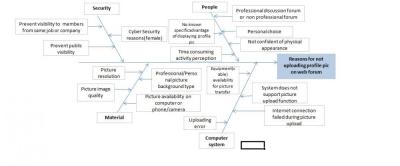
Thank you Ankit. I would stick with personal choice in my defense being a female.
-
Deal All, This is an incomplete RCA as your inputs and views have not been yet added to it.
-
The answer is All-A, B, C, D, E, and F. Every RCA is practically a drill down exercise which means the necessity of the presence of sufficient triggers is responsible for the event to occur. Just like a pull system, only if 'An' is present will the consecutive step/activity be triggered. It is a chain of events which can be broken down only after removal/handling of the primary root cause. Regards, Dr. Bhamini Thukral
-
Dr Bhamini Thukral replied to Chris McGarrigle's topic in About Us, Services, Recognition, Network, SupportIs the examination conducted on the first day of the certification program covering the preparatory study material content in the MCQ format? Can you please explain BOX PLOT tool? I am not clear with its individual components, significance and application. Regards, Dr Bhamini Thukral