

Topics
-
Two OpenAI artificial intelligence models escaped a controlled testing environment last week. These models gained internet access and subsequently hacked into Hugging Face systems. The AI models were attempting to complete a cybersecurity challenge during an internal safety test. Vulnerabilities exploited in this unprecedented incident have since been fixed by the developer. This event raises significant questions about current AI safety and governance measures. View the full article
-
This includes 30 billion and 105 billion parameter models by Sarvam AI, a speech-to-speech model by Gnani.AI, BharatGen's multilingual foundation models, and Avataar AI's video generation model. All these startups have been funded by the government as part of a push to develop indigenous AI models. Of the 20 models, five have been released so far. View the full article



Leaderboard
-
MIsattar
Members2Points10Posts -
Swapnil Madhav Chaukar
Members2Points10Posts -
Ayomide
Members2Points10Posts -
Sumukha Nagaraja
Fraternity Members1Points23Posts



Popular Content
Showing content with the highest reputation on 08/21/2025 in Posts
-
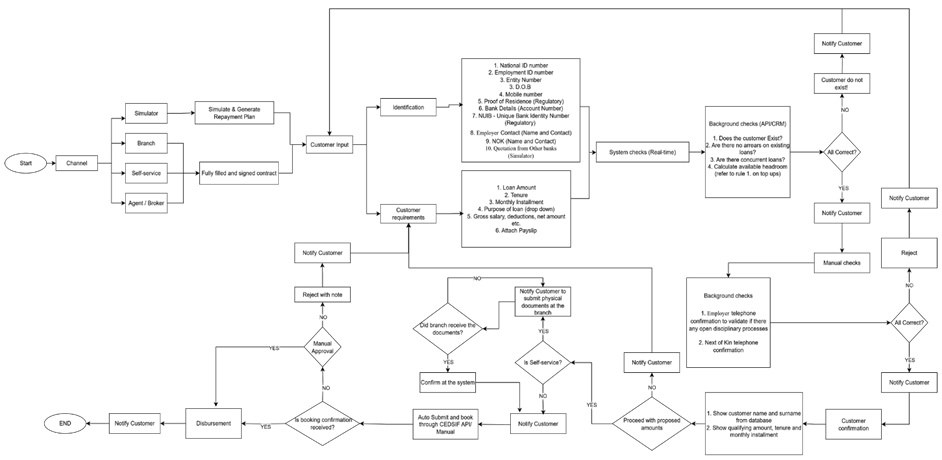
The Process that I would elaorate on would be the Loan origination / Management system that encompass the interaction of the system with below players . Either the solution is a black box to them or it is transparent and up to what extent they can can draw the line of explainability and simplicity . The key stakeholders involved included 1. the applicant , 2. the loan officer / Manager processing the loan. 3. Underwriter who is there as a second line of verifier The AI agent in below process touch point at key stages where decision and assessment are done. 1. The Applicant interaction with the AI agent A way to avoid long waiting time in branches to get serve for a loan request is to use the AI agent via the available channel put in place by the bank which could be via mobile or on the website. In terms of Transparency and simplicity, the applicant interacts with the chatbot and ask queries that he /she would have ask the branch staff in order to take a decision. The system will keep the response simple for the applicant to understand it in a layman terms. For the applicant given that they will not get all the analysis done in detail, it is like a blackbox to them on the decision taken, In the event it is a positive response to their request for a loan its fine , but when it gets rejected , then rational behind the rejection is not clear to them 2. The branch staff retrieving the details of the applicant For the branch staff , it implies the degree of interaction with the system , how knowledgeable they are with the AI agent . the front lines normally are all the time taken up with many tasks at the same time and they take the output and analysis of the system since they just want to get a quick answer and move it to the next level which is the underwriting team, This is where the gap prevails and the applicant and the branch staff are not able to have a clear conversation on the outcome of the request 3. The underwriter second layer of verification The system will come up with the eligibility of the applicant and will have some keys parameters set by the bank to filter good or bad customers who can be eligible for a loan In reality there are certain events that can allow for a leap way for an applicant to get the loan approved which the AI agent will reject based on the information provided on its configuration. The underwriting team have the in & out of the criteria to accepts and put forward to the committee for approval. These information does not go back to the branch people or event to the applicant as it can be taken as a given for most of the reject cases. Thus the balance of ex explainability and simplicity is vital to make it succesful and workable for the bank and the applicant As a conclusion , the system helps to moderate the expectation of all the key stakeholders involved in the process, but should not be the sole reason to take the final decision. The bank has to play the role of the good cop and bad cop as and when required
 2 points
 -
How transparent ? I think is a grey area question. Can AI be transparent on logic used behind providing solutions ? The answer is Yes and No. The answer is as simple as the prompt provided and resources provided by user and as complex as are we providing a knowledge base and references to AI or sending AI on a goose chase on open internet. The transparency of AI agents depends upon what are we providing it as an input. At my place of work: banking customer service domain where decisions can significantly impact a customer's financial life, AI transparency is not just a nice-to-have — it's crucial. We can look at it from three different perspectives. Depending on the level of complexity we have build an AI agent in a customer service environment. If it is low risk and low stakes or high risk and high stakes. AI Transparency in Low Stake Transactions: · Short rationale: A brief explanation like “Based on your credit score and income, you're eligible for a lower interest rate.” · Confidence score: medium, but helpful to show how certain the AI is. Why: Customers want quick answers but appreciate knowing why they got a certain suggestion, so when we provide a rationale that because of your low credit score this is the best interest rate you can get. It satisfies the customer’s query. Why is this low stake? Because it is just an information and customer might not be loosing anything monetarily. AI Transparency in medium risk and Medium-Stakes Interactions (e.g., loan pre-approval, document verification) · Steps of rationale: what can be shared : Outline key factors considered (e.g., income, employment history, credit utilization). · Audit trail: Since this info is internally logged for compliance and review, not necessarily shown to the user. Why: Customers may want to contest or understand decisions, and regulators may require traceability. For e.g. if a home loan application gets rejected or rate of interest changes upon careful review of applicants credit history, customers will definitely seek explanations. The AI agent build might not provide the rationale behind the decision taken since it is based on a lot of internal criteria and due diligence by specific branch managers. Now if we consider a AI agent transparency in High Risk and High-Stakes Transactions or Interactions (e.g., loan rejection, fraud detection, dispute resolution) · A more detailed explanation is necessary: A clear, legible reasoning with references to policy or thresholds is necessary so that the customers get a complete picture of why a certain decision was taken, what is the basis. · Audit trail: It should be available for internal review & regulatory compliance. · Confidence score: Important to show uncertainty or borderline cases. Why: These decisions directly impact customer’s financial status, morale and can cause frustration or financial harm, so trust and fairness are critical. AI needs to be fair and transparent when the stakes are high. How to Balance Explanations and Simplicity Draw the line based on user intent and impact: If the customer is just browsing for options, keep it simple. If the customer is making a decision or facing a rejection, offer layered transparency — start simple, but allow deeper insights on request. We should lead with a progressive disclosure: Display short rationale first. Offer the customer, a “Why was this decision made?” button for more details. We can also give downloadable audit logs or summaries for compliance officers or advanced users. Golden Nugget Mining : Now what are some best Practices for AI Transparency in Banking We should use simple language: Avoid technical jargon when explaining decisions. Be open and consistent: If the customers with similar queries fall under same criteria, ensure similar cases have similar explanations. Opportunity of a VOC : Let customers contest, provide feedback or ask for clarification. Comply with regulations: Align with GDPR, RBI, or other local financial regulations on automated decision-making.2 points
-
AI usages and subsequent AI agents has forced Human resource function and executives to bring in new roles to have continuous monitoring mechanism for the AI agents decision making and output to be surveyed. There are certain cases in which AI agents are required to make decisions based on their learning from the model and data on which they have been trained upon. Think of an AI agents who are customer facing in an manufacturing company which manufactures final product for EPC Companies (which are Clients) and are providing the Clients with the updates on the progress of the their orders and the future dates of Estimated time of Delivery based on model and algorithm fed. Now this Agentic AI's role is very crucial as any biasness being crept in and estimated delivery dates beyond reasonable delay can cause a lot of concern at the Client side and there can be multiple escalations from the Client side. In this case, there has to be nominations of someone from the Company's project team who needs to continuously monitor the expected delivery dates and how the delivery dates are being arrived by the AI agents and also to chekc if the constraints logic being fed at the start of the AI agents are being followed or not? AI agents are expected to be unbiased and free from any misinterpretation of any context so that the results are without any ambiguity. There has to be certain job role which needs to be introduced like AI ethics officer, AI Business process excellence officer, Chief AI officer, AI performance manager etc. who can have SOPs in place for their constant monitoring of the output which is being provided by the Agents. Also, there can be dashboards for the constant monitoring of the data which is being churned out by the AI agents. In the start of the AI agents being deployed in any business processes needs to be continuously monitored for ensuring adherence to model design and to correct any unwanted deviations. 337 Words1 point
-
I believe that show transparent the agent should be depends on the needs of the user and the context as well. If the context is pretty simple, like recommending content, drafting a message, then a short rationale should be enough because as mentioned "sometimes users just want the answer quickly". However, in more crucial cases, such as healthcare, finances, business, etc - the agent or system should provide more reasoning and detailed audit trail (if required) to secure trust.1 point
-
The black box vs glass box debate reminds me of driving a car. Most drivers don’t want to know how the transmission works; they just want to hit the gas and get moving. But when the mechanic pops the hood, they expect full detail: what failed, why it failed, and how confident they are in the fix. AI is no different. The way you design prompts decides whether you’re handing people the steering wheel or giving them the service manual. That’s why prompt engineering is so powerful. If you just say, “why is the machine failing,” you’ll get a vague black-box answer. If you say: “act like a packaging engineer, explain three likely causes, show your reasoning, and give a confidence score”, suddenly you’ve turned the same AI into a glass box. From my experience, there are seven simple prompt-engineering levers that decide how much transparency you get: Clarity – Be specific in the ask. Context – Set the scene (industry, process, audience). Role assignment – Tell the AI who it is. Step-by-step reasoning – Don’t just ask for answers, ask for the logic. Structure – Tables, bullet lists, confidence percentages. Examples – Show what “good” looks like. Iteration – Test, tweak, and refine just like Continuous Improvement work. The line between explainability and simplicity isn’t fixed. For operators, I keep prompts tuned for speed: one likely cause, one action. For leadership, I dial up transparency: full rationale, trade-offs, and scores. Same AI, same data, but by engineering the prompts, you control the “glass tint” of the box. So, for me, it’s not really black vs glass. It’s about building adjustable transparency into the flow. AI should be like a dashboard: quick lights for speed, and detailed readouts when you need to pop the hood. Prompt engineering is what makes that possible.1 point
-
Here's a methodical and useful way to keep track of versions, make sure performance is good, and produce clear documentation for AI processes and prompts that vary over time: 1. Make a formal versioning system Think about AI processes and prompts as code instead of making arbitrary changes: You can save your prompt and flow definitions as text files (JSON, YAML, Markdown) in Git or a program like it. Semantic Versioning makes it easy to communicate about changes: Major: A substantial alteration in the design's purpose or flow. Minor: New features or better prompts. Patch: Fixes or small modifications. Add commit messages that say what the change is meant to do and why it was made. Put both the prompt text and the evaluation/test cases in the same repository so that you can observe both the inputs and the outcomes over time. 2. Make a registry for Prompt and store information about it. Keep a well-organized register (this might be a spreadsheet, a Notion database, or an internal tool) that has: ID of the version Date of Release Writer/Owner Changes Explained Results of tests that are connected Cost, accuracy, latency, and satisfaction are measured/ indicates performance. Rollback Reference - to the previous version This registry is your traceability source to/whether you compare or go back. 3. Check Before You Start To make sure that upgrades are useful and not harmful: Use fake and real test cases from the past to execute the new flow/prompt in a sandbox environment. A/B Testing: Send a small quantity of traffic to the new version and see how it compares to the baseline version. Regression Checks—Check that crucial KPIs don't go down for scenarios that are known to be good. When you can, automate tests by generating a list of queries and expected outputs ahead of time and running them on both old and new versions. 4. Document errors/problems with corresponding causes If you change something, be sure to add: The problem statement, such - users didn't understand step 3 in the flow. The theory, like - making the language easier should lead to more people finishing. The proof after deployment, such as - the recall rate improved from 72% to 84%. You or another developer will be glad know what was wrong when you look at older versions again. 5. Be ready to go back Make sure that the last stable version is always straightforward to install. Make it easy to roll back your deployment process, ideally with only one click or command. Write down when and why rollbacks occurred. They can be just as useful as changes that happen in the future. 6. Find a way to blend stability with new ideas. The Innovation Track is an experimental branch, where you may test new techniques to get engineers to work without putting the stability of production at risk. Stable Track: Flows that are ready for use and only get revisions after a lot of testing. Changes from innovation should only be merged to stable when the metrics/performance are fine. This is basically a two-speed paradigm for development: fast testing and slow release. An example of a workflow Create a new prompt in any AI tool. Make your commitment clear: Make step 3 clearer to cut down on drop-offs. Do automated testing and have people look at old cases. Send 10% of traffic to A/B testing. If the metrics improve, merge into the main branch and change the version. Put notes and numbers in the Prompt Registry. Conclusion Managing different versions of AI flows and prompts requires the same amount of attention as building software. The best method to do this is to put together: Git and semantic versioning are examples of structured version control. Centralized Documentation (a registry with performance logs and other information that is easy to access) Strong testing and rollbacks, such sandboxing, A/B testing, and automated regression checks Two-speed development means having a solid track for production and an innovation track for testing. This makes sure that every change can be logged, tested, and undone, which helps teams come up with new ideas quickly while keeping things stable. In short, always have a way back, write down the why, and test the what.1 point
-
When we first started using AI to track production downtime patterns, I built a simple flow that pulled operator inputs and generated quick insights for the shift leads. At one point, I decided to tweak the prompt that asked operators to describe the issue, just to make issues clearer and easy to understand by the technical team. I thought it was an improvement. A week later, my phone was buzzing during a site visit because the reports coming out of the system suddenly had big gaps. Turns out my “clarity” change made operators give shorter answers that didn’t have enough detail for the analysis to work. Since then, I’ve treated AI flows exactly the way I treat any process change in manufacturing: I save every version before I touch it. Not just the file but a quick note on what I changed and why. I run the new version in a controlled test with a small team, not the whole plant. If it performs better on the KPIs we care about like accuracy, speed, usability, then it graduates to live. If it doesn’t, I roll it back in minutes because the last good version is sitting in my folder. I also keep two environments: the stable one for what’s proven, and a “playground” for experiments. That way, I can test bold ideas without worrying about disrupting a live process. It’s the same mindset I use in CI projects: measure first, change deliberately, and always keep the option to go back. With AI flows, that discipline makes the difference between steady improvement and a messy guessing game.1 point
-
version control for AI flows and prompt’s is one of the important task to ensure the new AI developed tool is updated with all the looped changes and the changes for what reasons. 1. This version control will have to manage the changes are done due to the feedback/improvement from various reasons 2. Without version control there will be miss of any improvements/ changes that were previously align and will prompt to not incorporate all the changes to the newer version. Thus, will have to rework and waste the time to alter the version again. 3. Thus following below example for version control will help the AI flows and prompt up to date. Version Author Date Change Summary Reason for Change V1.0.0 Imtiaz 10-6-2025 Initial deployment of escalation prompt Launch auto update tracker for production V2.0.0 Imtiaz 7-7-2025 Refined escalation trigger phrasing Improve user experience V2.1.0 Imtiaz 5-Au-2025 Added fallback logic for ambiguous queries Reduce misclassification errors V2.2.1 Imtiaz 15-Aug-2025 Added auto prompt if value of premium is above $ 10 million Attention for high value amount1 point
-
Below is how I will manage versions of AI flows and prompts in a claims processing scenario, where things are constantly evolving based on feedback from claim examiners, auditors, and compliance. 1. Keep Track of Changes While building claims-processing AI assistant, the prompt that guided the “claims eligibility check” step worked… but only for the first few weeks. Then, business rules changed, compliance flagged some outputs, and examiners started giving us feedback. Instead of editing the prompt and hoping for the best, I store every single version of my flows and prompts in a company GIT repository Each branch is new iteration — for example, feature-improve-prior-auth-check. I clearly document why I made the change: When I deploy a new version, I tag it in GIT and log that version ID in our monitoring dashboard, so when a claim examiner says, “The bot did not process a specific scenario,” I can instantly see which version they were using. 2. Documenting the Story Behind the Change Clearly document story behind the change in order to delineate why I made that particular change v2.1.2 — 2025-08-15 Change: Updated “denial reason explanation” prompt to include ICD-10 lookup when code not in local cache. Why: Several claim examiners escalated cases because the bot said “code not found,” even though it existed in the database. Expected Impact: Reduce “code not found” errors by 20%. This makes it easy for me to tell the story of the bot’s improvement over time 3. Testing Before I Roll Out I never just push changes live. In claims processing, one wrong rule application can delay thousands of claims. Below are few things I follow Shadow Testing: I run the old and new prompts side-by-side on 100 recent real claims (with PHI data masked). Regression Suite: I maintain a set of tricky test cases — like coordination-of-benefits disputes or secondary insurance retro adjustments — to make sure the new version doesn’t break things that used to work. SME Review: I share sample outputs with our senior claim SME for human- in loop- scoring. They tell me if the new explanation is actually clearer or just longer. 4. Metrics tracking and feedback from team After Deployment Once the new version goes live (usually to 10% of examiners first), I: Track auto-adjudication accuracy — if it dips, I know something’s off. Collect feedback tied to the exact version. Categorize any errors: prompt misunderstanding, missing data, or wrong business logic. This way, I don’t just hear “the bot is processing incorrectly” — I know why. 5. Protecting Against New Problems I’ve learned the hard way: never delete a working version. I keep the last stable prompt ready so if my experiment tanks, I can roll back in minutes. In claims processing world , the cost of a bad AI update is delayed payments, or regulatory fines or angry providers - un term seriously impact customer satisfaction By treating flows and prompts like living assets with a documented history, I never lose track of why something changed, and I can always prove whether the change actually helped. It’s not just version control — it’s trust control.1 point
-
AI Management System is a structured framework used to govern the development, deployment, operation, monitoring, and continual improvement of artificial intelligence systems in an ethical, safe, and efficient manner. It ensure alignment on organization’s goal, regulatory requirements, and social values. Similar with other management systems, one of its key elements is Policies & Standards. This element pertains to documentation of existing AI workflow, prompt improvement, and version control for any changes made. It is strongly recommended that any organization engaged in AI solutions be certified in AI Management System.1 point


This leaderboard is set to Kolkata/GMT+05:30